Boccia Data Model and Architecture
The Boccia Model contains the core business logic of the game. That includes things like the state of the game, ramp angles, settings and functions to control the game. The rest of the application is lumped into peripheral functions that only depend on the model, ex: ramp visualization, user interface, hardware.
To keep the diagram simple, many parts are shown as a single box, when they may actually be several different classes. The Boccia Model, may be several singletons that work together.
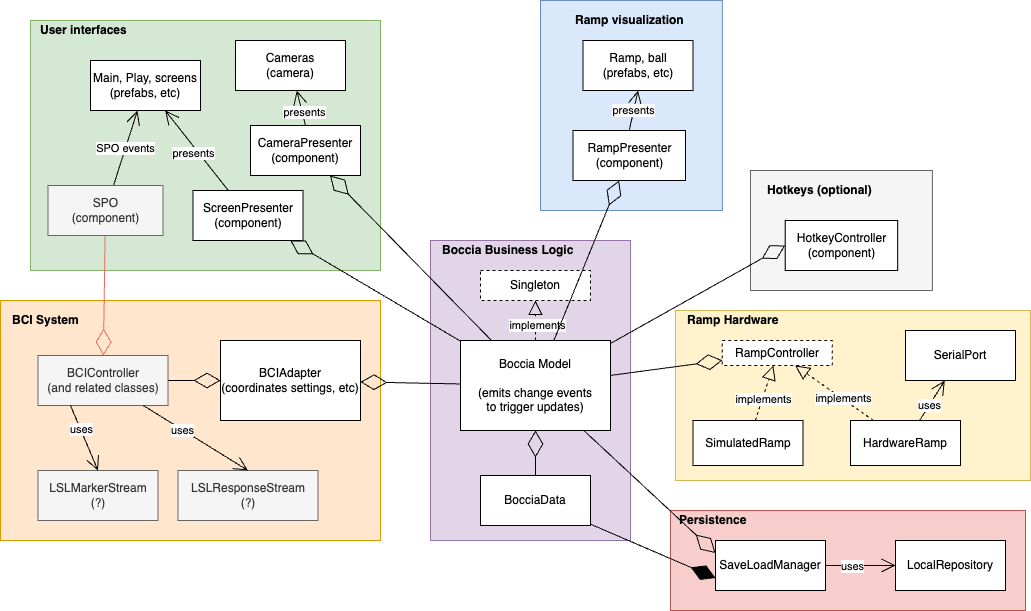
Communication between different parts of the application is performed through the model. This is done to simplify communication and management of state. For example:
- Rotate button is clicked
- Presenter tells singleton model to rotate ramp, ex: model.rotate(degrees)
- Boccia Model updates simulation of ramp
- Boccia Model emits event to signal change of state
- Ramp presenter receives event and reads model’s state ex: rotation, height
- Ramp presenter updates visualization
Peripheral functions can use events to communicate with the boccia model where it’s more convenient. For example, the RampController can emit an event when fresh ramp angles are available.
Direct communication between peripheral functions should be avoided as it makes coordination difficult. Ex: Boccia Model can handle switching between hardware and simulated ramp controllers. The ramp visualization and UI can just rely on Boccia Model for ramp angles (they never need to know about hardware or simulated ramps).
Bessy note
Bessy Unity was designed to communicate directly with a user interface elements though an array of SPO components (red line in diagram). This lets Bessy flash and select UI elements in response to BCI events. This approach couples the UI to the Bessy, adding complexity (ex: how does BCIController get the SPO array? what happens if SPOs are removed? what if the model needs to handle selection, not a UI element?).
Replacing the array of SPO with an event would simplify this. For example, Bessy emits select(3) and the application does what it wants with the event. SPO components can still exist, but they would just listen for events instead of a direct function call from BCIController. If an application doesn’t want to use SPOs, it can handle the events in a different way, ex: a single presenter.
Model contents
This may be multiple objects, or just lumped into a single object, we’ll see.
Navigation
A “navigation model” or “coordinator” knows what screen to show next. It’s handle navigation logic so that individual UI prefabs don’t have to. If a prefab’s “close” button is pressed, it tells the navigation model and the model sorts out what screen is next. An event is used to communicate when the screen has changed.
- state
- CurrentScreen (main, game options, start, play, virtual play, etc)
- control
- showStart(), showGameOptions(), showBciOptions(), doneClicked(), backClicked(), etc (we can get pretty creative here)
- event
- displayModeChanged (signals to UI, camera, to update the display)
Game
The “game model” contains Boccia game state: ramp angles, ball state, etc. The model provides a one stop shop for controlling the game. Simulation is delegated to other objects. For example, ramp movements are handled by a RampController (simulated or hardware), ball physics is coordinated by a presenter (Unity handles the actual simulation).
- state
- gameMode (stopped, live, simulated)
- rampElevation
- rampRotation
- ballState (ready, rolling, stopped ???)
- persistent state
- ballType, ballColor
- elevationPrecision, elevationRange
- rotationPrecision, rotationRange
- control
- rotateRamp(degrees), elevateRamp(degrees), resetRamp()
- releaseBall(), ballStopped(), resetBall()
- setBallType(type), setBallColor(color)
- event
- gameStateChanged
BCI
The BCI model is mostly settings for BCIController. We could just directly change BCIController properties in the editor to start. If we want to control these properties from within the application and persist them, then a model needs to contain the data. An adapter can listen for model changes and update BCIController as needed.
- state
- isTrained (not trained, trained)
- persistent state
- flashes, training windows
- target animation
- sham feedback on/off
- sham animation
- stimulus on duration
- stimulus off duration
- flash color
- testing state (?)
- num flashes
- stimulus on duration
- stimulus off duration
- flash color
- control
- mutators for the options UI, ex: numFlashesChosen(num).
- startTraining(), stopTraining(), resetTraining()
Ramp Hardware
Similar to BCI model, the ramp hardware model is settings and some specialized functions for calibration of the hardware.
- state
- isConnected (not connected, connected)
- any feedback from the calibration?
- persistent state
- serialPortName
- functions for UI events
- setSerialPort(name)
- calibrateMotor(motor) (all, ball drop, elevation, rotation)
- testMotor(name) (ball drop, elevation, rotation)