Navigation With Motor Imagery
This is a spike to quantitatively demonstrate how BCI accuracy, scan duration, and number of selectable objects will influence the likelihood that a user will be able to make a correct selection, and the time that it will take them to do so.
First, a few definitions.
Trial accuracy is the chance that the BCI will correctly read the user’s intention over the course of a trial.
Trial duration is the length of time required to make one selection (action v. rest) in Bessy.
Scan duration is the length in seconds for which a single object is presented for selection, before moving on to the next one.
Scan accuracy is the chance that the BCI will correctly read the user’s intention over the course of a scan.
Selection accuracy is the chance that the user was able to select their intended object from the list.
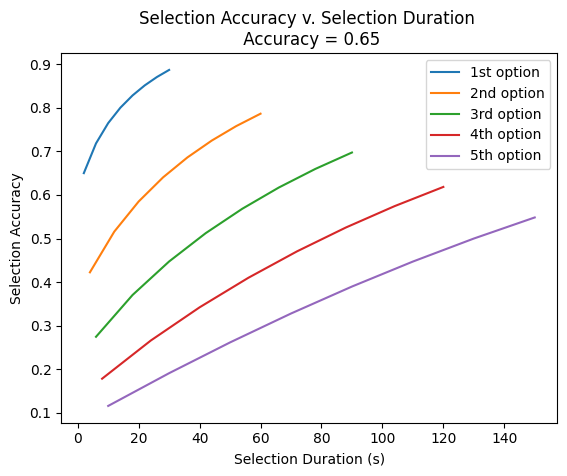
Selection duration is the length of time required to make a single selection, this value vary depending on whether or not it is the 1st item, 2nd item, 3rd item, etc. that has been selected.
The biggest problem with motor imagery is that the accuracy is poor for a single trial. The average (based on the fatigue and optimization) studies is ~65%. This is the trial accuracy.
We can supplement the trial accuracy by doing multiple trials, and having each trial “vote” whether the user’s intention is action or rest and taking the intention with the most votes. The obvious tradeoff of doing more trials and having them “vote” is that it takes more time. Below, we see how we can bring our scan accuracy up to ~90% by multiplying the number of trials by 15. (Side note: this “voting” only works with odd numbers of trials).
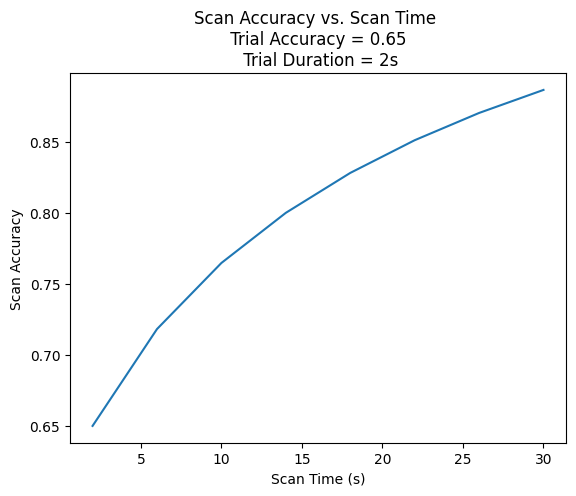
90% isn’t bad! But it’s also not the whole story. That is only the case for the first object we are scanning on. To correctly select the objects that are 2nd, 3rd, 4th to be scanned over, we need to correctly not select every previous object. ie. to select the 3rd object from our list, we need to pass on the 1st object (65% chance), pass on the second object (65% chance) and correctly select the third (65% chance) for a total likelihood of 0.65x0.65x0.65 = 0.275 only 27.5% chance!!! This makes it extremely clear why we need to maximize our scan accuracies.
The plot below shows how the selection accuracy decreases and selection duration increases for the 2nd, 3rd, 4th, 5th items to be scanned. This is why motor imagery is a very poor modality for menu navigation. To select the 5th item from a list, it will take 2 and a half minutes of constant focus to even a 50% chance of making that selection correctly!!!
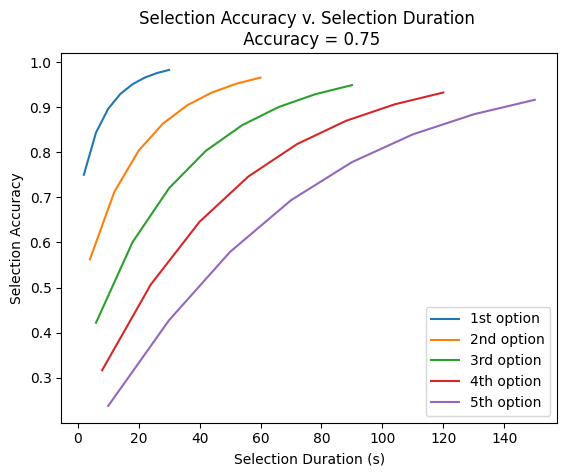
These issues become smaller with higher MI accuracy, but they don’t go away. This is show below by the same plot, but with a trial accuracy of 75%.
But still there are much better paradigms out there for selecting between multiple objects. For example, here is how P300s selection duration and accuracy match up. It is more accurate and faster than motor imagery and has an equal likelihood whether it is the 1st, 2nd, 3rd,… item being selected.
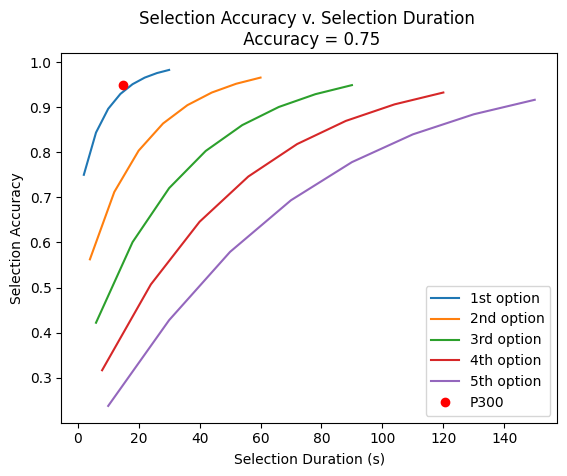
However, it is understood that we can’t always rely on visual paradigms. So here if motor imagery is the only way, then here are the key points.
- Use MANY trials and vote
- Minimize the number of selectable objects at all costs, you probably won’t be able to select the last ones from your list anyway
- Order your scanning in the order of likelihood that the user will want to select that object
Literature review
Here I will cover a few examples of previously validated navigation controllers using a two-command MI-based approach.
Robot navigation using a brain-computer interface based on motor imagery
Majid Aljalal, Ridha Djemal & Sutrisno Ibrahim 2018
In this study, the authors were controlling a robot that has four degrees of motion: left, right, forward, and stop. They used two commands to code these four actions in the following manner.
… the obtained categories are mapped into two-directional commands (left or right). Then, these directional commands are mapped into four low-level motions to navigate the robot to the destination (target position) using the developed posture-dependent control paradigm. In this paradigm, low-level commands are issued depending on the postural state of the robot. Figure 7 shows a state-machine diagram of the proposed paradigm. For maintaining stability, the robot was developed to prevent it from walking while turning left or right. While the robot remains in the “stopping” state, a “left” directional command forces the robot goes into a “no change” state until a “left” or “right” directional command is received. If a “left” (or “right”) directional command is received, the robot continuously turns to the left (or to the right) until a “left” or “right” directional command is detected again. If a “left” directional command is detected, the robot stops turning. However, if a “right” directional command is detected, the robot walks continuously forward in the direction it is facing. Finally, while the robot remains in a “going forward” state, a “left” or “right” directional command forces the robot to stop (i.e., go into a “stopping” state). In other words, a “left” or “right” directional command stops the robot if it is walking forward, while only a “left” directional command stops the robot if it is turning left or right.
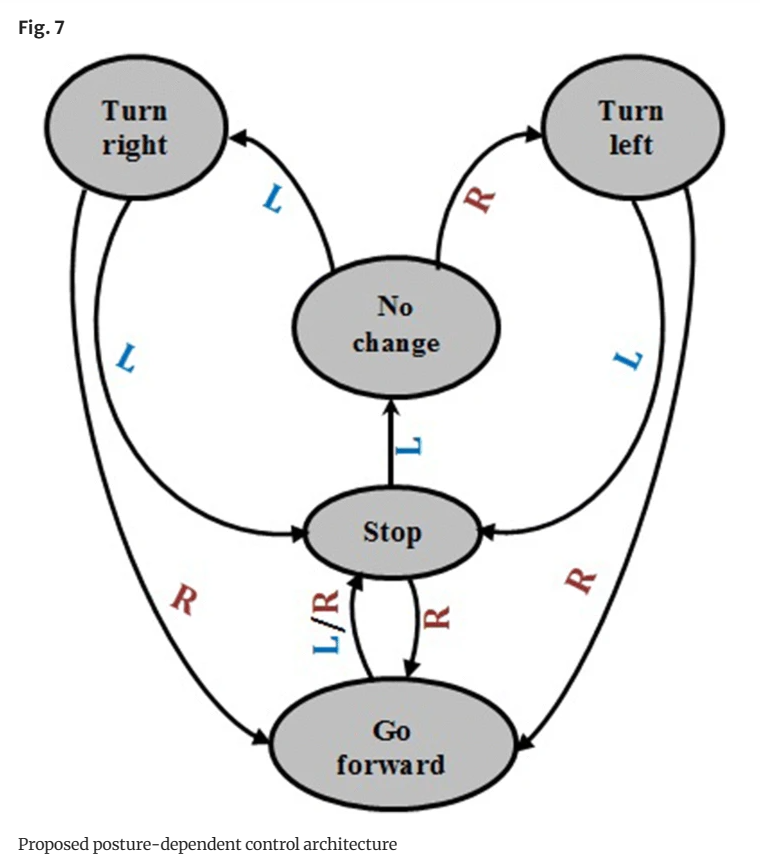
Authors mentioned that all subjects were able to control the robot to reach the desired trajectory. However, due to the controller implementation, subjects did need a longer time to instruct the robot in the desired direction.
ROS-Neuro: implementation of a closed-loop BMI based on motor imagery
Gloria Beraldo; Stefano Tortora; Emanuele Menegatti; Luca Tonin
In this study, the authors used two MI commands (i.e., imagined feet, and hands movements) to control a Robot Operating System (ROS), they provide one example on using ROS to control a cart in the Cybathlon BCI race. Similar to the study previously described, the system is mapped to control 4 movements:
- Right: the avatar turns to the right when a BMI event related to both feet motor imagery occurs;
- Left: the avatar turns to the left when a BMI event related to both hands motor imagery occurs;
- Light: this third command is achieved as a combination of the previous two commands. If a sequence of oppo-site BMI commands (feet-hands or hands-feet) occurs within a certain time window, the second command switches on the headlights;
- None: if no BMI commands occur, no control commands are sent to the game and the avatar will go straight.
The length of the selection window to do the light command can be adjusted depending on the users’ preference.
There is no mention of the users’ perception of this controller scheme as they used previously acquired data to validate the controller offline.