Saving Settings
Settings are always harder than they seem
“I need to save the settings” is one of the simplest, yet hardest requirements to address in an application. This is because “settings” have a lot of legs:
- how does an object access the setting?
- how does an object change the setting?
- do other objects need to be notified when a setting is changed?
- when are settings saved? (on change? or when commanded by user?)
- how does the application know what settings to save?
- when are settings loaded? (at startup? and/or when commanded by user?)
- how are the loaded settings pushed to objects?
- does the setting need validity checks?
- what are the default values?
- where are default values stored?
- how to handle an old saved session that lacks newer settings?
- how to test settings are saved/loaded?
- should settings be easily visible outside of the application (plain text vs some binary format)?
- do settings need to be protected from modification outside of application?
- should settings persist across different devices (presumably the same user)?
MindTV requirements
User requirements
- At startup, the application will have the default values.
- When a profile is loaded, the settings will be updated to the saved values for that profile.
- When a profile is saved, the current settings are persisted.
- If the user doesn’t save, settings are lost at shutdown time.
- User should be able to delete a profile.
Possibilities
Unity doesn’t provide much support for persisting game state, or in our case “user profiles”.
Application settings
Theres a PlayerPrefs static class (singleton) that can save basic key/value pairs (int, float, string). This is meant for application wide settings, like the volume, not persisting state like current level. There is no support to load different dictionaries to support profiles - that would have to be added on top.
User settings
JsonUtility can be used to serialize Unity objects like MonoBehavior. This seems like the better option for saving objects to disk. Most developers hand roll something on top of this to load/save/propagate settings.
Save managers
There’s several “save manager” examples in the wild: https://forum.unity.com/threads/complex-save-system-example.897968/. A similar approach is described here: https://forum.unity.com/threads/saving-and-loading-several-objects.1298808/. Another more in-depth: https://github.com/AlexMeesters/Component-Save-System
These solutions all use a “manager” coordinate the save/load behaviours of GameObjects. The manager finds objects with saveable settings by querying for those that implement an interface, ex: FindObjectsOfType<I_Saveable>.

The challenge here is making sure objects are present when you want them to save or load. If we switch scenes, a GameObject with settings may have been deallocated, or references to GameObjects may not have been initialized yet (ex: SceneManager.activeSceneChanged is seems to be called after objects are created, but before references are valid)
I spent a significant amount of time trying to make this work for MindTV, I concluded this pattern is suited to a game where independent GameObjects need to update after a scene has been created. That doesn’t map very well to the UI centric nature of MindTV.
Save it yourself
The opposite approach to “save manager” is to have GameObjects handle saving themselves. There’s lots of ways to do this, either using a singleton, or by passing the settings by reference to GameObjects that need it.
The nice part about this approach is the GameObjects handle their own settings when it suits them. This somewhat avoids the problem of telling objects when to persist data. Most can just do that when their settings are changed by the user.
The challenge is that sometimes other objects change the settings. For example, when loading a profile. This can be resolved with a messaging system, sort of like the “save manager” approach, or maybe leveraging the C# Event system. A similar approach can be used if objects in the same scene need to be aware of a setting change.
ScriptableObject
Not a very helpful name. ScriptableObjects combine the “save manager” and “save it yourself” concepts. They are meant for building a tuneable game that artists / creatives can adjust from the editor (ie: without programming). The parameters in a ScriptableObject can be changed from the inspector while a game is played and the changes persist. The ScriptableObject becomes an asset in the game. This video does a decent job of explaining the concept: https://youtu.be/raQ3iHhE_Kk.
Out of the box, a ScriptableObject is not for persisting user settings. From a Unity Blog https://blog.unity.com/engine-platform/6-ways-scriptableobjects-can-benefit-your-team-and-your-code: “While changes to ScriptableObject data do persist in the Editor, it’s important to note that they are not designed for saving game data. In that case, it’s better to use a serialization system, such as JSON, XML, or a binary solution if performance is critical”.
Digging deeper, ScriptableObjects provide a way to separate data from the logic - an important step towards modular code. Essentially, the ScriptableObject becomes the “model” of the Model View Controller pattern (or MVP, MVVM, whatever, same idea).
Unity’s JsonUtility can serialize a ScriptableObject to JSON, but it doesn’t serialize a list of ScriptableObjects in the way we would expect. With a normal class, the serializer will output the public class members (see serialization rules). When the class inherits from ScriptableObject, you get a list of references to the instances, ie: the SO assets.
So, I think that means you have to dump the stuff you want to persist into another class, then serialize / write to disk. On startup, you reverse the process and write to the ScriptableObjects. Why did they make that last little step hard?
Solution
Sharing data between GameObjects is difficult and this is bogging down the team. It’s also making settings extremely hard to load and save. Model View Controller patterns are the standard solution to this problem. They provide a way to separate concerns and make data sharing easier.
MindTV will use a combination of the “save manager” and “save it yourself” approaches. We will treat the settings as the “model” of the application. A scene “controller” (or “presenter”) shall pull settings from the model on creation, and when settings are changed they are written back to the model. This will provide a one-stop-shop for settings, making it easy to share between scenes. Persistence of settings is just a matter of serializing the model.
For simplicity, a singleton object shall be used to access settings (ex: SettingsManager.currentUser). GameObjects can write settings to this object whenever it suits, ex: using a property or some kind of event handler (ex: button clicked).
A “controller” will handle serializing the SettingsManager.currentUser to disk. When a profile is loaded, SettingsManager.currentUser will be overwritten with new settings.
Most GameObjects will obtain the most recent settings on scene creation. For example, after loading a profile, the user will move to a different scene, causing the latest settings to be loaded.
Some GameObjects persist between scenes. To refresh those objects a “ProfileLoaded” event will be emitted by the settings controller.
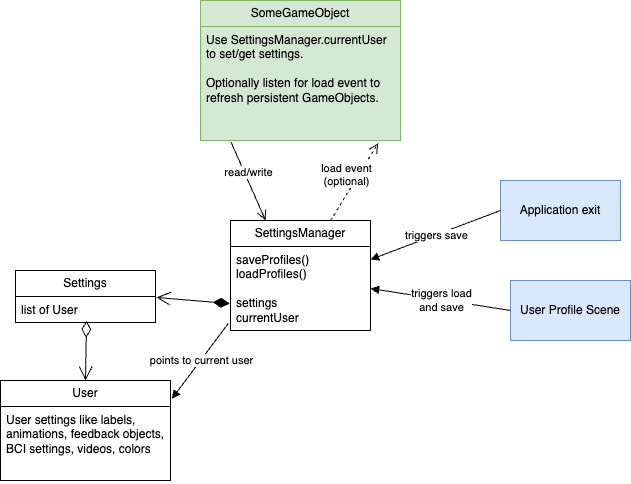
A more generic summary of how to architect the parts that make up MindTV application is here.