Bci Essentials
Overview
BCI Essentials is a tool to add brain-computer interface (BCI) selection into games or applications built in Unity, and hopefully elsewhere in the future. The goal is to have a state-of-the-art backend for BCI processing which can be implemented into games and applications by people unfamiliar with minimal understanding of BCI systems.
There are currently two sides to BCI essentials which exist in separate GitHub repos. BCI Essentials Python and BCI Essentials Unity. BCI Essentials Python is the backend which does the signal processing, feature extraction, and classification. BCI Essentials Unity is the frontend that the user interacts with, it is responsible for providing stimuli (if necessary), offering context to the user regarding what is selectable, and providing feedback when a selection is made.
BCI Essentials is primarily a research tool in the BCI4Kids lab. It is used to collect, process, and save BCI data in a completely transparent way. Flexibility is critical for achieving the lab’s aim of improving BCI for children. BCI Essentials Unity must be flexible to meet the needs of individual users. BCI Essentials Python must be flexible to test different methods of classifying BCI data to improve the state-of-art for pediatric BCI classification. BCI Essentials has many different types of users, both inside and outside of the lab, with various levels of development experience and BCI knowledge. The different users of BCI Essentials and their interactions are outlined in Personas / Use Cases.
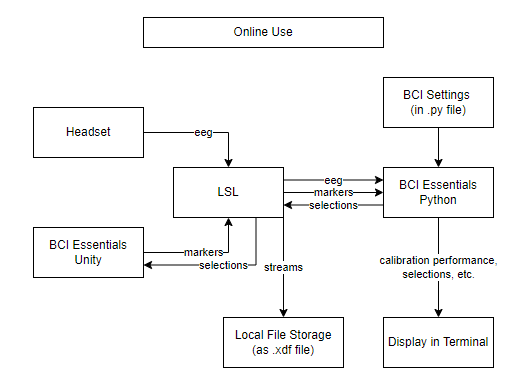
There are two main ways to use BCI Essentials, online or offline. Online use of BCI Essentials is for running the BCI with a user. The user wears an EEG headset which measures the electrical activity of their brain. The user looks at a screen which displays the visual elements of the BCI using BCI Essentials Unity. On screen there are “selectable objects”. Different BCI paradigms such as P30, motor imagery, and SSVEP offer different methods of selecting these selectable objects. Selections can be made based on EEG activity from the brain combined with the context of what is being displayed on screen, which is communicated in the form of “markers”. Lab Streaming Layer (LSL) time synchronizes the EEG from the headset and the markers from BCI Essentials Unity and sends these to BCI Essentials Python. BCI Essentials Python processes and classifies the EEG and markers according to defined settings in the BCI Essentials Python run file. The classification in BCI Essentials Python is analogous to estimating which selectable object the user was trying to select. This “selection” is passed back to BCI Essentials Unity through LSL. The corresponding object is then selected in the game or application, which provides feedback to the user and the process repeats. At the end of the session, all of the data which passed through LSL (including EEG, markers, and selections) is saved to an XDF file so that it can be reviewed later.
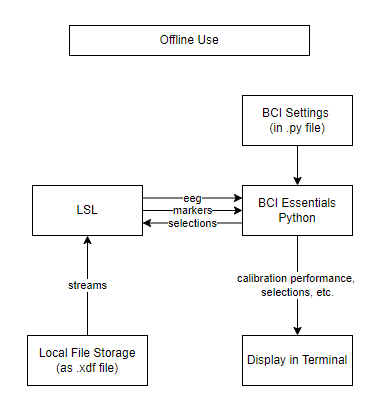
Offline use of BCI Essentials is for testing and tuning the BCI processing pipeline in BCI Essentials Python. Saved stream data from previous online sessions is pulled from local storage and reconstructed into markers and EEG data. This data is processed by BCI Essentials according to settings in the Python file used to run the BCI. Outputs such as calibration performance, decisions, and computation time can then be used to evaluate how the BCI would have performed differently, given the settings. This allows for the testing and tuning of different settings for signal processing, feature extraction, and classification.
Resources
Bessy Python: https://github.com/kirtonBCIlab/bci-essentials-python
Bessy Unity: https://github.com/kirtonBCIlab/bci-essentials-unity
Intro and some diagrams: Using BCI Essentials with Unity
Team
| Member | Role |
|---|---|
| Eli Kinney-Lang | Research lead |
| Greg Wilding | Engineering Manager |
| Brian Irvine | Software Developer |
| Daniel Comaduran Marquez | Software Developer |
| Anup Tuladhar | Software Developer |
| Alexander Damjanovski (Unlicensed) | Software Developer |