Unity Application Design
Overview
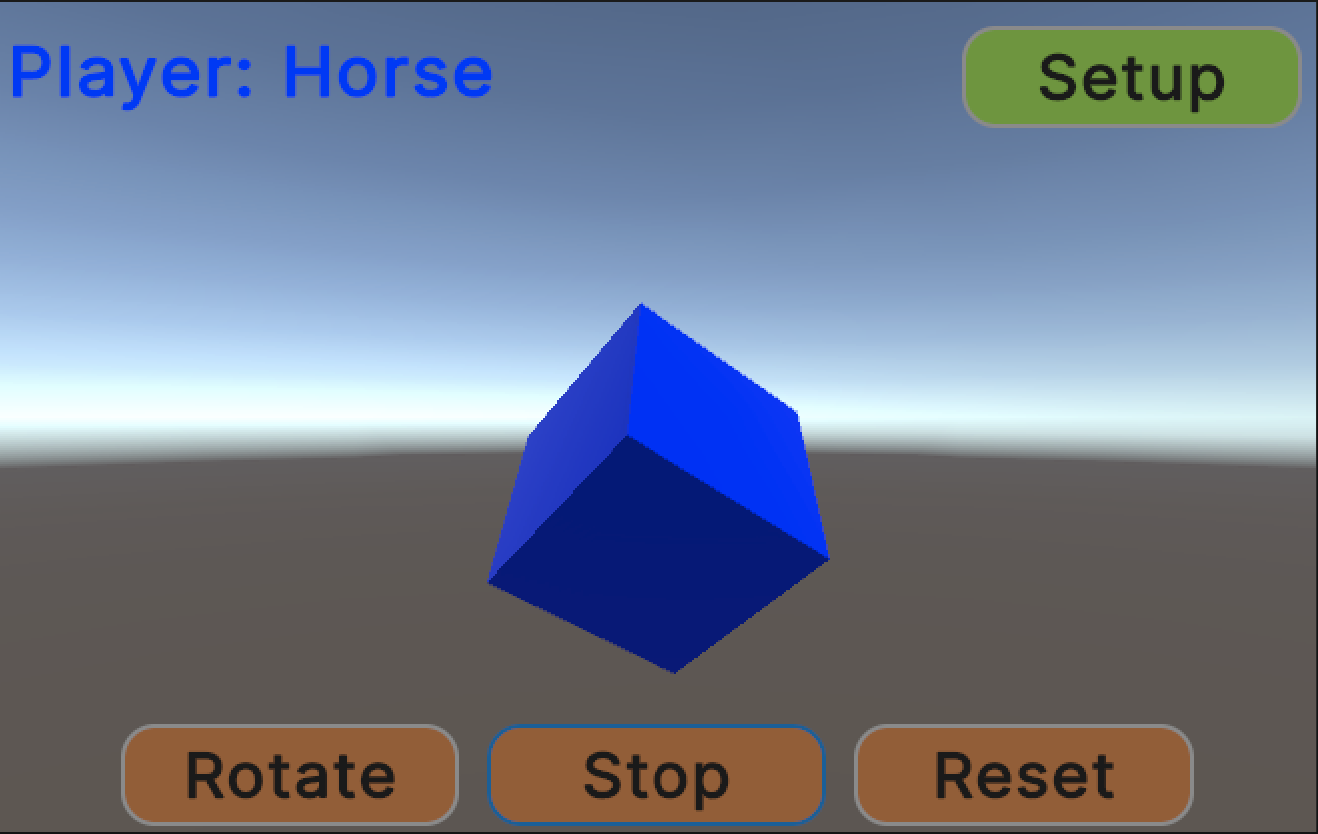
This demo application shows solutions to some common challenges with Unity. The application is a “game” that consists of a rotating cube. The user can control the rotation of the cube, enter their name and choose the color of the cube. The game data is saved between sessions.
Design
The application roughly follows a “hexagonal” or “clean” architecture, where the core “business logic” is separated from peripheral functions like managing the user interface, visualizing game elements, saving game data or communicating with a BCI system.
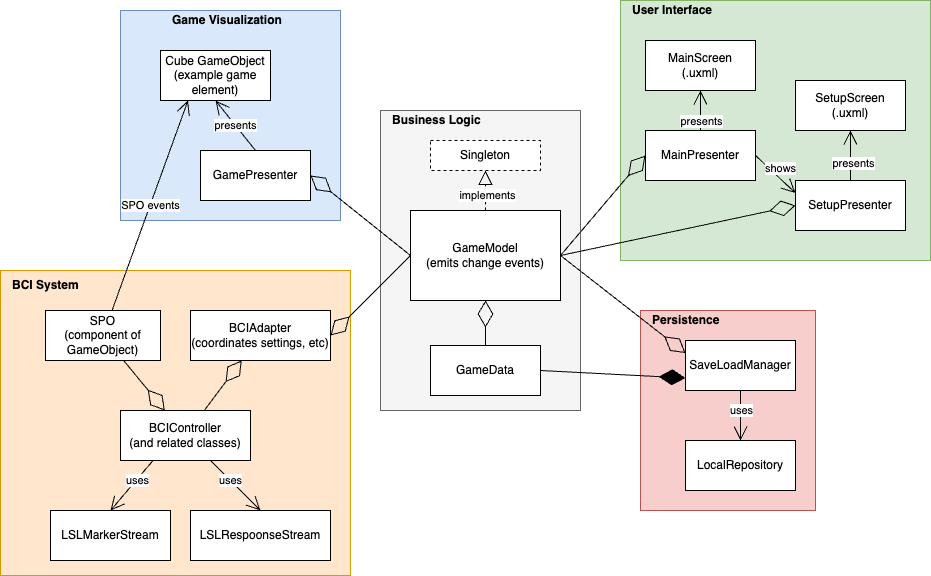
The basic rule of this architecture is that the core business logic does not depend on peripheral functions, it does not even know they are there. The peripheral functions are likewise isolated from each other - they can only interact through the business logic. For example, if a the user clicks the “rotate” button:
- A Button tells MainPresenter it was clicked
- MainPresenter tells GameModel to rotate the cube
- GameModel processes the request and emits an event indicating that the game state has changed
- GamePresenter receives the event and updates the presentation of the cube.
This may seem like a lot of interaction for such a simple game, and it is. You could lump all of this logic into a single MonoBehavior blob. This would work fine, take less time to do and Unity won’t care. However, when a new feature is to be added to the game, problems will arise. Now someone must dissect your blob and make changes without breaking existing behavior. They’ll have to pay the technical debt that was incurred by making a blob.
The architecture presented here is intended to make future changes to the application easier. By following a consistent pattern, the next developer will have an easier time understanding how the application works. By avoiding unnecessary coupling, new features can be added without breaking existing ones.
World space
In this application, the “game” is just a rotating cube. It is presented in “world space” using Unity’s 3D engine with GameObjects, prefabs, cameras, lighting, etc.
The user interface is treated as a completely separate component within the application. Although the buttons and labels appear to be “on top” of the world space, they are not part of it. Instead, they are implemented using Unity’s newer UI Toolkit, which is meant for creating overlays and heads up displays.
User Interface
This application uses UI Toolkit for the user interface, which is similar to web development in html and css. There’s a single UIDocument GameObject that reads in a .uxml file for the UI structure and a .css file for the styling. It works for editor and runtime UIs. The main benefit of using UI Toolkit is less code and faster implementation (compared to Unity’s older GameObject based Unity UI toolkit).
The UI can be edited visually using Unity’s UI Builder tool, but be warned, this isn’t a simple drag + drop editor, you need to understand how CSS flexbox layouts work. The UI Builder just outputs .uxml, so you could just hand edit these files. Finally, one can to code the UI completely in C# and make your own View class. This may be the best approach in the long run as C# is much easier to diff and merge than .uxml.
(Note - Please forgive the terrible styling of the game (especially the tabs). I didn’t think it was worth putting a lot of time into this, other than to show the styling could be changed)
Singletons
Singletons have their issues (ex: injecting dependencies for tests), but with Unity, a benefit is not worrying about who creates the object.
The creation of non-GameObjects in Unity is particularly challenging. In most programming environments, there’s a clear entry point where the main objects of the application can be created, ex: main(). Unity doesn’t have this, so we use the Singleton pattern instead. In the demo application, GameModel is a singleton. Anything needing to access GameModel does so via it’s static Instance property: GameModel.Instance. The first time GameModel.Instance is accessed, the GameModel object is created. See Singleton template class for more info.
Model View Presenter
The architectural pattern used for visualizing the game and the user interface is “Model View Presenter”. Read more about that here: https://resources.unity.com/games/level-up-your-code-with-game-programming-patterns. Model view presenter is essentially a UI focused version of clean architecture when a “presenter” adapts data in the a model to something a view (UI element) can display.
Why do it this way? It makes the code easier for the next person to understand. It also makes it easier to share data. Each peripheral function in the application only needs to know about GameModel to get data or to execute some particular function in the game (ex: change the cube color). There is no need to dig through a hierarchy of GameObjects to find a component that has the data you want.
Persistence
The GameModel uses a simple GameData class to store all the important game state. GameData is a plain old C# class that is easily serialized.
The SaveLoadManager loads a GameData from disk and provides GameModel with a reference at startup, see GameModel.Bind(). GameModel uses the GameData to store state, etc. SaveLoadManager retains it’s reference to GameData so that when it’s time to shut down, it can just write the GameData back to disk. This requires no participation from GameModel, etc.
BCI System
(Note: this is proposed, it is not part of the demo application yet)
The bci-essentials-unity (aka Bessy Unity) package can probably be used as is with this design (as of v1.1.5). An adapter class can receive GameModel change events and update BCIController and/or BCIControllerBehavior as needed.
Start training example:
- User presses training button
- GameModel changes to a “training” state
- Adapter receives GameModel change event and tells BCIController to start training
Selection example:
- BCI system makes a selection
- BCIController hierarchy informs appropriate SPO
- SPO component emits Selected event
- Another GameObject component handles the selected event (presenter function, game object “manager”, etc).
Bessy could be refactored to make it easier to integrate into applications:
- Bessy Unity relies on an array of SPO components (added to GameObjects) to trigger flashing, etc. Providing this array is a bit tricky (there’s several approaches embedded in the BCIControllerBehaviors). Strictly speaking, Bessy Unity is just converting LSL messages to/from events for a given BCI paradigm. The SPO dependency could be flipped such that SPO components (or a GameModel) could listen for events with their ID number.
- Similarly, there is come code in Bessy Unity that creates GameObjects with SPO components for various use cases (ex: P300 grid of objects). This code is currently embedded inside the BCIControllerBehaviour hierarchy, which seems like a secondary concern. It would be cleaner to provide GameObject creation functionality as a separate factory object (etc).
Hardware interfaces
(not in the diagram, but the same clean architecture pattern)
Additional interfaces could be added to this design just like the other peripheral functions (game visualization, user interface, BCI system, persistence). Following a clean architecture approach, the interface has an adapter that talks to the GameModel. Events can be used to communicate to other portions of the application (like the GameModel and BCI System do).
Examples can only do so much
The game is too simple. A real application would have several presenters related to representing game elements. The business logic would be decomposed into several models and the models would delegate as much as they can to helper classes (ex: color settings always have 3-4 properties, game state machine).
Some coding best practices have been skipped to keep the application simple. For example, rather than directly depending on a GameModel, the presenters (etc) should depend on an interface implemented by GameModel. That would make it easier to isolate them for unit tests. It would also avoid re-compiling all presenters when the GameModel changed (not a problem until the application becomes large).
Some more complicated example projects from Unity are here:
- https://assetstore.unity.com/packages/essentials/tutorial-projects/dragon-crashers-ui-toolkit-sample-project-231178
- https://assetstore.unity.com/packages/essentials/tutorial-projects/quizu-a-ui-toolkit-sample-268492.
- User interface design and implementation in Unity: User_interface_design_and_implementation_in_Unity.pdf