Bci Unity V2023 03 vs V2023 08
In this spike I will describe the differences between BCI Essentials Unity v2023-03 (old) and v2023-08 (new). For v2023-03 I will use the BCI-boccia repo, and for v2023-08 I will use the latest version of BCI-essentials-Unity as of 2023-08-25.
Assets vs packages
The first main difference lies in the fact that the new version uses a packaging approach. In the project tree view, the new version has a dedicated package named BCI Essentials. This package contains folders for: editor, plugins, resources, and runtime folders. Conversely, the old version uses the assets folder with subfolders for: controllers, LSL, prefab, and SPO scripts.
The old version (v2023-03) would require any GameObject to had the BCI tag and use an MyObjectID number to be reference in the mainSPO script. Thus, one would have to programmatically choose what were to happen with each object by checking the MyObjectID number.
The newer version (v2023-08) uses the Unity event system. In this case, after generating a GameObject, the SPO script can be dragged into the object to use the event system which is displayed in the inspector view (Fig. 1).
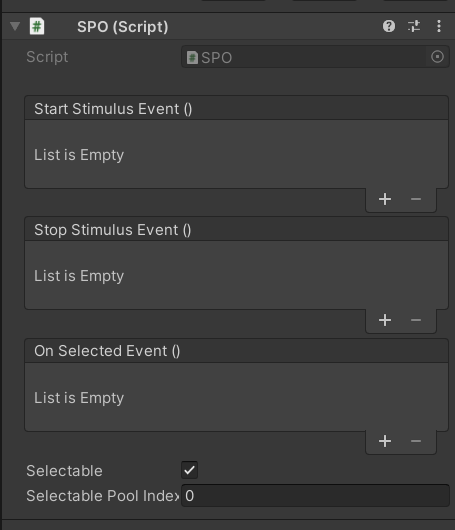
In the event system we can add events using the plus + symbol located at the bottom of each event section (i.e., start stimulus, stop stimulus, and on selected). A new menu opens and we can select a method from any class script we have in the project. This allows for simpler implementation comparted to the previous implementation where one would have to look for the MyObjectID number in order to select what would happen at each one of the previously mentioned event sections.
Transitioning your code
To transition your code from v2023-03 to v2023-08 can be quite challenging depending on the original implementation. As mentioned above, v2023-03 depends on programmatical lookup of the MyObjectID property of the BCI-tagged component. Thus, transitioning the code would need the developer to write a new class to have the desired functionality for the start stimulus, stop stimulus, and on selected events. These new methods would have to be manually dragged to the inspector to use the Unity event system. However, the benefit is that for scaling the project, the developer can modify each individual object using the event system rather than doing the solely programatical implementation.
Notes
LSLResponseStreamshows as obsolete in the new version.
Author: Daniel Comadurán Márquez
Date: 2023-08-28