Application Design
{:toc}
Application structure
Separating data from visualization is a fundamental software design concept. It forces developers to think about how data will be shared in an application, leading to more modular and easier to understand code.
We do this all the time in other domains, ex: putting data points in a spreadsheet and then generating plots from those points. We wouldn’t use a plot to store the data points - that would make it really hard to produce a different plot. And yet… in software, we tie our code into knots trying to work around this basic design mistake 😔.
The design pattern that solves this problem is called Model View Controller. There are as many variants to this pattern as there are authors of pattern books, ex: MVP and MVVM. The essential concept is this:
- data lives in a Model (a container)
- the data is displayed by Views (user interface elements)
- a Controller coordinates the interaction of Model and View
Data is shared though the Model. If a user types their name into a View, that data is sent to the Controller to store in the Model. If another View needs to display the user’s name, the Controller will fetch the data from the Model and give it to the View.
Events are shared through the Controller. If the user presses a button to delete their name in a View, the button press event is sent to the Controller. The Controller handles removing the name from the Model. If another View also needs to know about the change, the Controller can emit an event for other Controllers to listen for, ex: UserNameDeleted.
The model view controller pattern can appear at different scales within an application, for example, a complicated view may have an internal controller and a model containing local data.
Below is what the pattern ends up looking like within MindTV. The term “manager” was used instead of controller because we already have a lot of those in the code. The Settings object is more or less a model (user settings are described later).
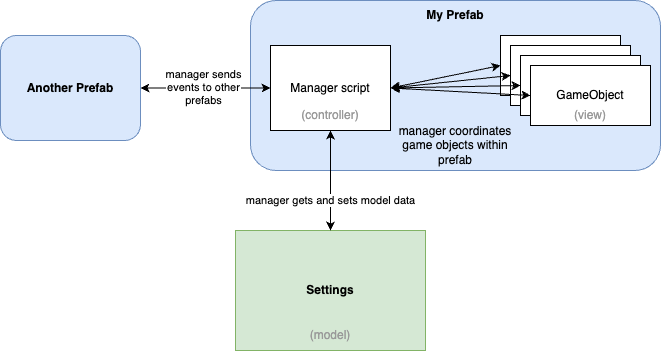
Prefabs have a manager
A prefab shall have a manager script to handle coordination of internal game objects (and prefabs). The manager can delegate work to other objects as appropriate, ex: a helper class.
Avoid attaching random scripts to game objects inside the prefab. This is because nobody else will know they are there. MindTV developers will know to look at the manager script to figure out how the prefab works.
If a subset of GameObjects really needs their own manager script, consider making another prefab (for example, dropdowns, buttons, tabs all do this).
Manager is coupled to the prefab
As a developers, we’re told that coupling should be avoided. However, without some coupling, all you have is a pile of Lego. The manager is going to be coupled to the contents of the prefab, and that’s ok. Developers know to look at the manager to understand what it’s connected to.
The prefab manager script will need references to the internal game objects (and prefabs). These can be created with simple drag+drop within the Unity editor. References created in this way will not break if the internal hierarchy of the prefab is changed.
Looking up internal objects programmatically is also fine for a single level of hierarch. Multiple level (ex: sibling->child->child) lookups are fragile and should be avoided.
Manager subscribes for events
The prefab manager shall use it’s references to internal game objects to subscribe for events. This approach is preferred to using the editor as it’s easier to trace later on. A developer can look at the manager script to discover who’s talking to who.
void initializeListeners()
{
   trainingLabelEntry.onEndEdit.AddListener(LabelChanged);
   ...
}

void LabelChanged()
{
   ...
}
Use events to communicate outside of prefab
The prefab manager script should not have references to prefabs above it’s own hierarchy. These external references create to hard to debug problems (ex: null references caused by game object creation order). Instead of a reference, emit an event and share data through the Settings (ie: the model).
User Settings
The Settings object has a list of User objects. Each User represents one “user profile” or collection of things we want to persist.
A SettingsManager is responsible for loading settings from disk and providing the current User to the rest of the application.
A prefab manager script accesses the current User via SettingsManager.Instance.currentUser . This is known as a singleton pattern. The main scene creates SettingsManager and all scenes share the same instance. Note - SettingsManager isn’t created if you start the application from a different scene (there’s a way to fix that if it becomes problematic).
The prefab manager script is responsible for passing settings to internal GameObjects. Typically this is done once when Start() is called.
The prefab manager script is also responsible for storing settings when they are changed. This is done by setting values within the current User.
The SettingsManager will write the Setting object to disk when the application exits.
// get current user settings from singleton, or use a dummy object
Settings.User user = SettingsManager.Instance?.currentUser ?? new Settings.User();

// do things with settings
my_text_label.text = user.userProfileName

// save settings
user.userProfileName = "new name"
Abide the law of Demeter
Code that goes digging().through.another().object is violating the law of Demeter.
The code is not only hard to read, but it is fragile. The caller is now coupled to the internal design of other objects. Add a method to the object that performs the operation you require instead.
For example:
foreach(Tab tab in tabs)
{
  Color newColor = tab.background.color
  newColor.a = alpha
  tab.background.color = newColor
}
Let Tab handle it’s own business:
foreach(Tab tab in tabs)
{
  tab.SetBackgroundAlpha(alpha)
}
Further reading
Some useful references for how to architect applications within Unity:
Classic design patterns: https://unity.com/resources/level-up-your-code-with-game-programming-patterns
Architecting your application around ScriptableObjects: https://unity.com/resources/create-modular-game-architecture-with-scriptable-objects-ebook
This looks interesting re: an architecture for organizing view controller communication using generic “I’ve been clicked” scripts. This addresses the problem of broken references, OnClicked() function calls buried in the editor: https://github.com/kurtdekker/datasacks